Showing posts with label windows. Show all posts

How to open ISO file ??


A simple walkthrough to open an ISO files in a minute. If you had downloaded any Games online you might know that the file usually comes with an extension(.ISO). For others, that may befuddle mind and puzzle what was that??.  Simple, It is a virtual image file of an entire DVD or CD, and like an archive holds many installation files, for example ZIP, RAR etc. 

What to do with that ? How to open it ???...  . 

These files looks strange and causes confusion. However,there are many number of ways to open these files. Legitimate way is to burn in a disc with support of Burning softwares like NERO etc. If you want to directly run this file without burning ; you need the help of third party softwares like Virtual disc,Daemon tools, Winrar etc.

With Winrar :

To open with winrar Go to options > Settings > Integration > Check it ISO extension, like as shown in below picture.

Winrar Settings pane


With Daemon tools:


1.Download daemon tools

2.After installation, it creates a virtual drive in Devices list Called BD-ROM Drive.

3.Now open Daemon tools, Go to preferences> Integration > check ISO extension and save it .
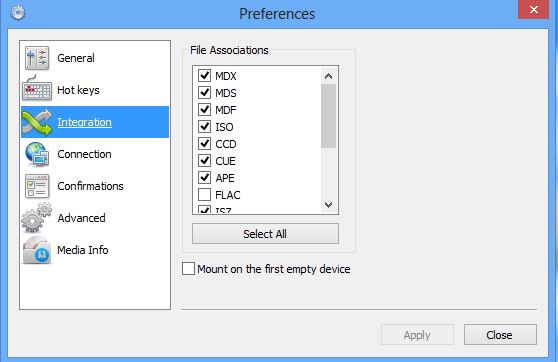

4.Then right click on iso file > open with > Click Daemon tools and save it . 

Copy and paste easily with Click.to


Tired of copy and paste? Need a new method to copy and paste it in easily. If you want it you should try this Click.to.

We have tired of copy and pasting the messy things from unknown sites to known sites,whether in editing files within your desktop,or to share the information over the internet. To do these tasks we need a manual steps of copying text and pasting it to online,editing and again copying a photos, posting it in sites; if it is in other languages we first pass through software translation,to error checking,to hardisk and lastly to final destination. Doesn't this consuming lot of time and irritating?

Click.to makes it easier to copy and paste with just a click to different services like search the map in Google maps,send to ever note, post to website etc etc.It makes easy by jumping steps to destination easily. It is widely used for ever note, Facebook, Google maps,Emails,Desktop applications. 

Lets say for example If you are reading an E book of your famous author while your are reading you saw an obscure word or unknown location which you ever heard.In that position without wasting time you can jump of to location in Google maps with a click of mouse or with keyboard(Ctrl + C) symbol appears next to mouse click,hover and select Google maps and see where the location it is.For Social sites if you want to paste the different photos located in different locations would take a lot of time to post in Facebook twitter,etc but with this select the pictures and then click.to to post in different locations at a time despite copying each time and pasting again and again and it saves some clicks.

By default there are more than 30 plugins in it includes utilities,social sites,shopping, and you can add on your own wesbite and a desktop application easily from the options menu lies on taskbar.Click.to is available for Windows and MacOS only

Viber for Windows and MacOS 10.7+


Viber,an engaging software useful to connect people via text,video and photos for free of cost all over the world.Offering VOIP services resembles as Skype used to communicate with a phone number. There are a lot of apps offering these but we need a most successful product like this to connect end users easily without any complex steps.So far it has been available for Windows Phone,Android,iOS,Blackberry Windows Phone, and Nokia(s40 and s60).And now Desktop Client is added in this list which works with Mac OS 10.7+ and Windows, to attract the PC users.And they haven't made any changes to their services with this update. For those who don't know much about Viber, i can say in short form "it offers a chat like whats app video chat like Skype,photo chat like social networks".

With this Desktop client it has aimed to enthrall the pc users to use this service with more functionality. Viber works with using 3G and WiFi  making your phone number as ID.After installing on mobile phone it automatically synchronizes your phone contacts and displays Viber contacts those your friends already using it. It offers a services like Free calls ,Group chat at a time,share locations,emoticons,push notification to other number and most significant is ad-free .

Before downloading Viber you have to activate it first on your phone,or else you can't have it on desktop directly.Hence in order to use this service on desktop you must be an activated user that can only be done on Mobile phone.Once you have done this start installing Viber on windows desktop with these simple steps given below

1.Run the setup file with admin rights
2.It will ask you 'Do you have Viber on your mobile phone?' Say yes to continue
3.Enter your mobile number and hit next
4.Type the activation code which was sent to typed phone number
5.Read and agree User licence agreement and hit enter 
6.That's all Enjoy 

Download website to your harddisk - Cyotek WebCopy


If you want to see an article on website you surely need an internet connection to access those webpages again.Downloading webpage site to site takes a longer time to complete that task and you may download article to PDFs it also takes time.So Recently we got a solution to this, helps you a lot in getting rid of messy actions.
Cyotek Web Copy is freeware software lets you access the website even in offline by saving webpages it in hard disk. This gives an answer for how to access websites without an internet connection.Using this software view a webpage or website offline like in a browser. After downloading it automatically configures the path for a website including its photos, style sheets etc Unlike manual procedure clicking on each website separately in browser, we can navigate pages with in software easily,saves lot of time. This software also offers the tools to download the certain part of webpage to your hard disk.


Downloading website
Downloading website


User interface is damn good than others and sense like browsing the internet.To download a webpage type the URL  and  Copy website, but we can't estimate how much time it gonna take.Some websites may differ a lot in viewing due to unsupported languages. Copytek has different features like rules to manipulate the part of webpage that has to download,Forms and password to set username and password;prompts while opening a website from your hard disk View links in your website all at one place both internal and external ,generate a report on missing pages and media,map your website visually with UML diagrams

It would be the best software in case to download the pages and view it in other computer assures the data with you for the further reading.But some website might not configure properly due to some problems so better to avoid it.Before downloading the website decide enduring space available in your hard disk for sake some website have tons of information and media includes in it.Transfer of date is similar to FTP technology , and easy to use it with a click. After downloading the website, detailed report is generated displays details about images, currently working links etc .


Rules to exclude
Rules to exclude


It supports all windows version from XP to 8 running time will be a bit longer don't bother if you want it anyway. And this software is for further reading only and  not for copying it for personal use or for commercial use.Use it at your own risk

Source : http://cyotek.com/cyotek-webcopy

Registry Alert - Protects your registry


You may have seen some changes in your core file system when installing a software to your machine. They have the choice to run on start up  this happens because it edits registry to run at windows start up. And some malicious virus attacks were done while installing unwanted application in your computer. Some software's come with a other bundles like toolbar,scanner, ...etc drone people and drifters not see all this and install it with default settings. Installing a software is not just clicking next..next..next..go on until installation completes,this process may disrupt and harm your machine easily. It is recommended to use this software to track the changes in your registry. 

Registry Alert is freeware that helps you in protecting the computer from malicious attacks.This runs automatically on start up and monitor registry entries, if problem identifies gives you an alert with options remove,allow,and block now.
You can modify programs later in the list of allowed and blocked content.It's operation are complex based for normal users. So we recommend not to use unless you have the ability to understand the registry files.


If you like this article rate it and comment

Enable Write-protection to USB devices


It's a tricky method to block the transfer of data from USB device and vice- versa  Many of schools,offices and other public places use this method to block the USB devices so that they ensure it would not affect with virus easily.If you are one concerned about the theft to your machine. Then you can take care with this simple registry edit.

With this edit you can permit users to read the data in USB devices but prevents copying data to your machine with a tag of write-protect enabled to USB stack.

Before doing,Backup your registry to safe place to regain to its original state. Let's start here Open run through a shortcut key(Windows+R) or from start-menu with admin privileges and type "regedit" hit enter. Make a backup by selecting the export button in file menu and save it your desired location in your hard disk(don't save it in external drive or in USB devices)
Storage policies in Registry editor
Storage policies

Navigate to HKEY Local Machine-->SYSTEM-->CurrentControlset-->control-->Create Newkey( StorageDevicepolicies). In the right box Create a new 
DWORD(32 bit)Value by right click-->new-->DWORD(32bit) Value with name "Writeprotect". Next click on it and give a value 1 to enable the write protection. To disable it follow same procedure and give it a value 0. Save and close it
Write-protect with value 0 or 1

(OR)

To do using CommandPrompt Open cmd with admin rights and type 'diskpart' and enter. Next type 'listdisk' Drives are listed on command prompt with their names . Then 'select diskname'-----> 'attribute disk set readonly' and press enter. Shows Disk attributes set successfully. Check you will not see delete option in rightclick menu on disk files

DISKPART> select diskname
disk name is selected
DISKPART>attribute disk set readonly
Disk attribute set successfully

To undo follow same steps and change is 'attribite disk clear readonly' Exit check again to confirm.


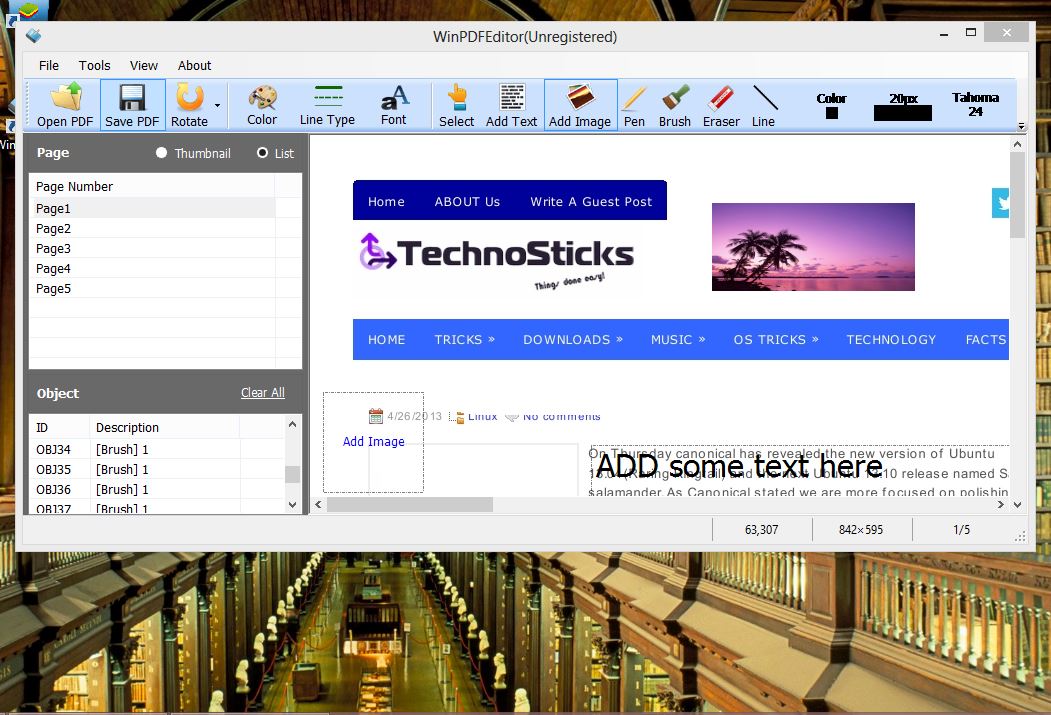
WinPDFEditor - PDF Editor


winPDFEditor is the best pdf editing software for the windows users enables you to adding text,images, delete and some more.Using this tool makes you to edit the text,font and rezing the image.It is a light weighted application could run on any windows operating system.Interface similar to the Microsoft office with a short tools of add text,remove content,rotate PDF,insert image etc
It has conversion tools converts to other editable documents like txt,.doc,Html, SWF and image files. Additionally it offers to add watermark whenever you want to protect your content online.

Features:
PDF viewer
Reliably fast 
Allows you to Annotate and editing
Conversion tool
Rotate PDF

Drawbacks:
Download free until 5th MAY 2013

Get it now here


Speaker Admin 2.0 - Controls Sound Automalically


As i posted about Flux in my last post,I have got another article looks similar to the flux and the change is Sound.Have you experienced children or something irritating you with loud noise when you are at work.Most of the people have this problem,for those this post would benefit you.


Speaker Admin is a freeware program setups your system volume automatically corresponding to you time in a day.It soothes your mind by mitigating noise levels in night and brings back the tremendous sound in daytime automatically,useful for the people who living with bizarre people.You can setup up to 5 intervals of a day,in different time lengths to have different settings applied automatically.By default it have 4 time intervals for 6 hours  You can change it by clicking options tab as per your situation,see example above.You can hide system volume tray icon,password protect,mute and a custom time interval.So other programs won't allow to operate automatically with system volume, in case you can change the settings later by allowing such program in system admin control panel.Password protect program to prevent access to normal people who uses your computer and set limits to other users.


System admin is a very tiny application hardly takes 10mb hard disk easy to setup with a few clicks and a few customization steps is required.It is very useful to people who work on sound daily.

Supported OS:Windows xp/vista/7/8


Flux - Color adjuster


People who are texting on their computers in nights may have abserved that blue light glow but during the daytime screen looks normal rises like a sun.it could suffer user hard to get into sleep
Flux is an automated program which adjusts you screen light and color according to your time.It adjusts normal in the daylight and warm in the night time. This feature works with your time displayed in your system. This program is designed to reduce your eye strain during nighttime. 

According to Wikipedia This program is developed by micheal Herf(Picasa Programmer). No need to operate anything,it is automated once after installation run on startup. Flux is available for windows,MacOS,Linux and ipad/iphone

Flux Homepage

Kcleaner - Junk cleaner


As there are many programs to clean up your hard disk cache but we do look for the best from them because many applications bundle with other software which were included in it. You may choose on your choice, but we recommend the best.


Kcleaner performs best in cleaning the unwanted cache and files that are stored in your computer.It tracks every file commonly like cache,temporary file history,cookies,log files ,DNS cache etc. Interface is complicated and looks different with a set of different tools to optimize your computer for the best performance.

Many users might haven't notice their computer response will get slow as the usage became more and more.This happens because your hard disk collects all the information you made and their cache is stored in a hidden place. To clean those files Kcleaner has to be installed in your computer. It scans your hard disk,tracks every junk file and cleans those files automatically 


Kcleaner has two modes(Basic and expert).Basic mode displays manual mode and automated mode,manual mode lists out analyse and clean, doesn't display total information which you are deleting.Expert mode lists out all options and file types you can setup which files to delete in this mode. Kcleaner can run as automated tool proceeds in background,cleans up in every interval. Interface is straight forward and available in various languages which can select after installation

Download kcleaner now

FantaMorph 5 - Morph easy


Credit : Flickr
Abrosoft FantaMorph is a powerful tool to morph the photos easily and accurately.It packed with a huge set of tools in a lesser size which are more useful when you are morphing the video.It could add more essence to your fun.

FantaMoprph performs best compared to the other morphing tools but seems to be hard to use for the amateur user. However it gives you the tutorials after the installation. It's size 8MB,after completing an installation you would get a prompt to view some video tutorials,best way to get rid of complexity use. With this tool u can include the animation to a picture,screensaver ,create a greeting card and many more.Once you learn from video tutorials,use of this software would be more easy. 

FantaMorph is available in three versions(standard , Professional and Deluxe ). It supports all type of file formats includes AVI,JPEG,PNG,PSD and GIF. Interface is also simple and standard with a set of tools like crop,flip,shade,wrap etc.At the start it asks for the type of Morph and next to select the source and destination pictures.In this version tools like New layer Morph,Face locator's,Sequence list panel,Dots transform would be more useful.Some of the tools helps you automatically adjust parallel to the destination picture, includes preview to view it any time and export it to your desired format can be jpeg,flv,Gif etc.

pros:

  • Can create New layer morph
  • Supports popular image formats
  • Improved performance
  • Includes video tutorials


Cons:

  • 30 days trial pack

Drop N Sync:Download facebook albums


Since,we have a manual option to download in Facebook but what if you want to download a stupendous photos at a time,its a headache. Just as many other options to download Facebook photos but everyone thinks to download in an easy way just in a few clicks. Drop N sync is the best choice to that. Drop N Sync gives you an easy way to upload and download photos in tons, it was designed for this particular use.Interface looks similar to the drop box, synchronizes all the photos from the Facebook automatically to your computer.

It is best option to get rid of headache,time consumes a lot and damn easy way to operate.It downloads all albums which you where tagged in and places it to a folder. Uploading tonnes of photos is as gentle method by dropping in folders or photos and it will be present in your profile in a few minutes.

It is a light application,size of 3MB and it offers you to install a certified toolbar(optional). After the installation authorize the app with your Facebook username and password and you need to grant permissions to access your data. Next two blocks will appear one shows your system files and other for Facebook album lists. 


Download window

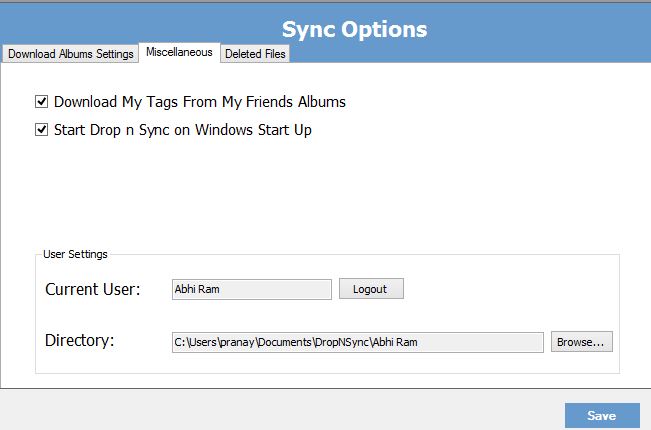
Download options are available in two types "download all","select albums to download " and other is to stop downloading.And deleted photos shown in deleted tab and you could re-sync it.To change the default download directory click on miscellaneous>user settings>directory. Miscellaneous tab have options like run at startup and user settings,useful if you want to change to new user.Upload photos or a folder by dragging to other block, add name and setup privacy in that window.

Features:


System Requirements:

Version:1.0
Supported OS: Windows xp/7/8
Space required : 4MB


Great Movie Collection Managers


Media Companion


If you have the majestic movie collections and TV shows you don't know about it. Media Companion a best tool to retrieve the information on those movie details. It downloads the all the information about the movie from the relevant databases which officially published in internet.It's usage would be complicated in the first use and makes easier to understand.

After the initial installation this program automatically scans your media files and identifies its titles to list out the movies select it manually. Once the screenshots,description,Team members in movie,Revive it to find out the information is true or not.If not check the file in hard disk and rename it to correct file name or paste the movie id located in IMDb and get the information from it.

It automatically accumulates the information from the popular sites like IMDB ,TVDB, subtitles from subscene.com and many more

It also supports TV shows displays all information related to that shows you might missed out last episode,arrange it into a date wise order and export the  list to HTML.


Related Posts 

Plugin for WordPress, Blogger...