Showing posts with label Desktop. Show all posts

How to open ISO file ??


A simple walkthrough to open an ISO files in a minute. If you had downloaded any Games online you might know that the file usually comes with an extension(.ISO). For others, that may befuddle mind and puzzle what was that??.  Simple, It is a virtual image file of an entire DVD or CD, and like an archive holds many installation files, for example ZIP, RAR etc. 

What to do with that ? How to open it ???...  . 

These files looks strange and causes confusion. However,there are many number of ways to open these files. Legitimate way is to burn in a disc with support of Burning softwares like NERO etc. If you want to directly run this file without burning ; you need the help of third party softwares like Virtual disc,Daemon tools, Winrar etc.

With Winrar :

To open with winrar Go to options > Settings > Integration > Check it ISO extension, like as shown in below picture.

Winrar Settings pane


With Daemon tools:


1.Download daemon tools

2.After installation, it creates a virtual drive in Devices list Called BD-ROM Drive.

3.Now open Daemon tools, Go to preferences> Integration > check ISO extension and save it .
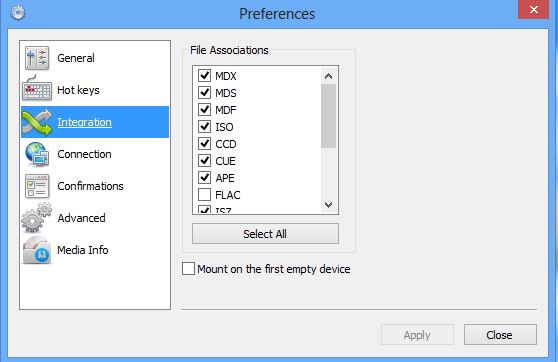

4.Then right click on iso file > open with > Click Daemon tools and save it . 

JoliDrive - One account for all drives


Today many people are bothered about their storage and privacy in online, because there are multiple of services and as well as multiple of conditions also. In the first priority, our concern goes to cloud storage, which made to incline our needs easily. Jolicloud is a family of jolidrive and joliOS are a file organisers of stuff like photos,videos,documents and so on, sits them in the right place automatically.You may view, modify and delete a file or files in one interface. This Jolidrive gives easy access to all the cloud storage files by combining all accounts at one place, accessible from the sidebar.

The files in your cloud accounts like Skydrive, Instagram, Flickr, Google Drive, Dropbox, Soundcloud, all are automatically organised into a category for best User experience. The files are can be viewed and play songs without downloading on the same screen. JoliDrive is free to use, offers a fantastic interface and awesome services that you might not seen up to now.


Waiting still? Move on to Jolicloud now here

Viber for Windows and MacOS 10.7+


Viber,an engaging software useful to connect people via text,video and photos for free of cost all over the world.Offering VOIP services resembles as Skype used to communicate with a phone number. There are a lot of apps offering these but we need a most successful product like this to connect end users easily without any complex steps.So far it has been available for Windows Phone,Android,iOS,Blackberry Windows Phone, and Nokia(s40 and s60).And now Desktop Client is added in this list which works with Mac OS 10.7+ and Windows, to attract the PC users.And they haven't made any changes to their services with this update. For those who don't know much about Viber, i can say in short form "it offers a chat like whats app video chat like Skype,photo chat like social networks".

With this Desktop client it has aimed to enthrall the pc users to use this service with more functionality. Viber works with using 3G and WiFi  making your phone number as ID.After installing on mobile phone it automatically synchronizes your phone contacts and displays Viber contacts those your friends already using it. It offers a services like Free calls ,Group chat at a time,share locations,emoticons,push notification to other number and most significant is ad-free .

Before downloading Viber you have to activate it first on your phone,or else you can't have it on desktop directly.Hence in order to use this service on desktop you must be an activated user that can only be done on Mobile phone.Once you have done this start installing Viber on windows desktop with these simple steps given below

1.Run the setup file with admin rights
2.It will ask you 'Do you have Viber on your mobile phone?' Say yes to continue
3.Enter your mobile number and hit next
4.Type the activation code which was sent to typed phone number
5.Read and agree User licence agreement and hit enter 
6.That's all Enjoy 

Enable Write-protection to USB devices


It's a tricky method to block the transfer of data from USB device and vice- versa  Many of schools,offices and other public places use this method to block the USB devices so that they ensure it would not affect with virus easily.If you are one concerned about the theft to your machine. Then you can take care with this simple registry edit.

With this edit you can permit users to read the data in USB devices but prevents copying data to your machine with a tag of write-protect enabled to USB stack.

Before doing,Backup your registry to safe place to regain to its original state. Let's start here Open run through a shortcut key(Windows+R) or from start-menu with admin privileges and type "regedit" hit enter. Make a backup by selecting the export button in file menu and save it your desired location in your hard disk(don't save it in external drive or in USB devices)
Storage policies in Registry editor
Storage policies

Navigate to HKEY Local Machine-->SYSTEM-->CurrentControlset-->control-->Create Newkey( StorageDevicepolicies). In the right box Create a new 
DWORD(32 bit)Value by right click-->new-->DWORD(32bit) Value with name "Writeprotect". Next click on it and give a value 1 to enable the write protection. To disable it follow same procedure and give it a value 0. Save and close it
Write-protect with value 0 or 1

(OR)

To do using CommandPrompt Open cmd with admin rights and type 'diskpart' and enter. Next type 'listdisk' Drives are listed on command prompt with their names . Then 'select diskname'-----> 'attribute disk set readonly' and press enter. Shows Disk attributes set successfully. Check you will not see delete option in rightclick menu on disk files

DISKPART> select diskname
disk name is selected
DISKPART>attribute disk set readonly
Disk attribute set successfully

To undo follow same steps and change is 'attribite disk clear readonly' Exit check again to confirm.


FantaMorph 5 - Morph easy


Credit : Flickr
Abrosoft FantaMorph is a powerful tool to morph the photos easily and accurately.It packed with a huge set of tools in a lesser size which are more useful when you are morphing the video.It could add more essence to your fun.

FantaMoprph performs best compared to the other morphing tools but seems to be hard to use for the amateur user. However it gives you the tutorials after the installation. It's size 8MB,after completing an installation you would get a prompt to view some video tutorials,best way to get rid of complexity use. With this tool u can include the animation to a picture,screensaver ,create a greeting card and many more.Once you learn from video tutorials,use of this software would be more easy. 

FantaMorph is available in three versions(standard , Professional and Deluxe ). It supports all type of file formats includes AVI,JPEG,PNG,PSD and GIF. Interface is also simple and standard with a set of tools like crop,flip,shade,wrap etc.At the start it asks for the type of Morph and next to select the source and destination pictures.In this version tools like New layer Morph,Face locator's,Sequence list panel,Dots transform would be more useful.Some of the tools helps you automatically adjust parallel to the destination picture, includes preview to view it any time and export it to your desired format can be jpeg,flv,Gif etc.

pros:

  • Can create New layer morph
  • Supports popular image formats
  • Improved performance
  • Includes video tutorials


Cons:

  • 30 days trial pack

Drop N Sync:Download facebook albums


Since,we have a manual option to download in Facebook but what if you want to download a stupendous photos at a time,its a headache. Just as many other options to download Facebook photos but everyone thinks to download in an easy way just in a few clicks. Drop N sync is the best choice to that. Drop N Sync gives you an easy way to upload and download photos in tons, it was designed for this particular use.Interface looks similar to the drop box, synchronizes all the photos from the Facebook automatically to your computer.

It is best option to get rid of headache,time consumes a lot and damn easy way to operate.It downloads all albums which you where tagged in and places it to a folder. Uploading tonnes of photos is as gentle method by dropping in folders or photos and it will be present in your profile in a few minutes.

It is a light application,size of 3MB and it offers you to install a certified toolbar(optional). After the installation authorize the app with your Facebook username and password and you need to grant permissions to access your data. Next two blocks will appear one shows your system files and other for Facebook album lists. 


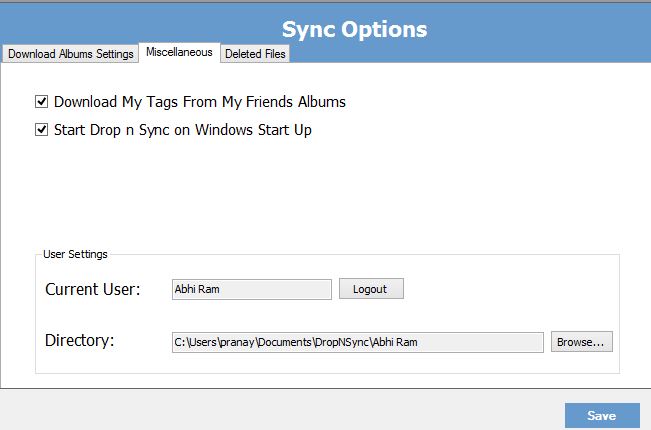
Download window

Download options are available in two types "download all","select albums to download " and other is to stop downloading.And deleted photos shown in deleted tab and you could re-sync it.To change the default download directory click on miscellaneous>user settings>directory. Miscellaneous tab have options like run at startup and user settings,useful if you want to change to new user.Upload photos or a folder by dragging to other block, add name and setup privacy in that window.

Features:


System Requirements:

Version:1.0
Supported OS: Windows xp/7/8
Space required : 4MB


Capture your screen on windows


7capture:


Best screen capture utility to get the exact screen shots without the sharp edges.It gives the best quality picture that has already modified from the old one. Although you have the inbuilt screenshot utility Snipping tool in windows 7/8 but it is different from that like It removes the corner edges to give the exact picture 
It automatically handles and re correct the image on auto-semi transparent background and rounded corners
And removes transparent background
IT has the special feature that any image can be convert into your favourite one(JPEG,IMG, PNG....)


It is free to use and easy to customise with utmost quality. So i recommend this to use if you want to get the image in a good Quality


Windows Screen Capture Tool


It is the capturing tool designed for work with the windows systems With this capture the whole screen, capture a selected area or any web pages.Watermark can be done on the image to protect your image with a copyright logo.


Features:

  • Capture screen efficiently and east 
  • Having the shortcuts to use it in an easy manner
  • Metro UI
  • Having option to capture window,screen and selected area
  • Give copyrights to your images by adding custom text watermarks to the Image
  • Includes a basic Image Editor
  • Requires .NETFRAMEWORK4.0 installed in your operating system


Great Movie Collection Managers


Media Companion


If you have the majestic movie collections and TV shows you don't know about it. Media Companion a best tool to retrieve the information on those movie details. It downloads the all the information about the movie from the relevant databases which officially published in internet.It's usage would be complicated in the first use and makes easier to understand.

After the initial installation this program automatically scans your media files and identifies its titles to list out the movies select it manually. Once the screenshots,description,Team members in movie,Revive it to find out the information is true or not.If not check the file in hard disk and rename it to correct file name or paste the movie id located in IMDb and get the information from it.

It automatically accumulates the information from the popular sites like IMDB ,TVDB, subtitles from subscene.com and many more

It also supports TV shows displays all information related to that shows you might missed out last episode,arrange it into a date wise order and export the  list to HTML.


Related Posts 

Plugin for WordPress, Blogger...